Hotspots with Nextion screens

I have built a lot of hotspots.  I put Nextion screens on most of them from 2.4 inch to 7 inch.  My main one is a duplex dmr hotspot and the mmdvm was built in Germany and it is quality stuff.  I have recently upgraded the 7 inch screen that was on it for the past year to a “More things” screen.  I had known that Nextion put our “basic” screens that are numbered NX8048T070_011 where the “T “ indicates it is the basic… Then there is the enhanced version NX8048K070_011 and here the “K” indicates the Enhanced version which has more memory and can hold a “more complicate” screen set of functions… but recently I saw a screen design that I really liked produced by HS9AWO.  Unfortunately it required a “P” screen with is called “Intelligent” and it does require a much better power supply but the outcome is worth it.

His (HS9AWO)  screens are becoming extremely complicated and include a lot of functions.  The most recent one includes a real time clock… and allows for changing TG’s and or Reflectors (depending on what mode you choose).  and it has a “screensaver” that just reverts back to a full clock with a nice background picture.  They even have sound available if you hook up to the proper gpio pins (I assume as I have not tried that yet).  I really like my new screen as I did not have a nice clock in the hamshack , well I had several small ones and another one that runs on another pi ‘HamClock” but this one is on all the time so it functions as a larger desk clock…

1-SAM_7180

Here it is functioning as the hotspot – dual Timeslots…

1-SAM_7175

Here it is between use and screen saver functions…. the orange numbers were changed back to white once I figured out he has it set to show ‘hot” pi temps but only on C scale and I had mine on F scale so anything over ?50deg was showing hot numbers even though it was not hot per F scale…

1-NIK_0687

Here it has dropped to the selected screen saver and the stream flows.  Nice touch and I must assume there are sounds for it.

Always something new to try in Ham Radio hobby…


WD0AJG

Amateur Radio Newsletter – Tuesday, October 29, 2019


Amateur Radio Newsletter

Ham radio news, commentary, giveaways, and more!
Celebrating 24 years of service – 1995-2019
Over 7,000 subscribers!
Too many e-mails? Switch to Weekly Edition
Unsubscribe

Tuesday, October 29, 2019

  • Olivia Digital Mode (1000 Hz) on Twenty Meters – A Simple Video
    The Olivia digital mode on HF radio is a mode capable of two-way chat (QSO) communication (keyboard to keyboard, like RTTY) over long-distance shortwave (HF) ionospheric propagation paths, especially over polar regions. If you are interested in more than a logbook QSO (such as is typical with FT8 and other propagation-checking modes) but want to […]

Thank you for being an AmateurRadio.com reader and subscriber to the Amateur Radio Newsletter.

Do you like to write? Please consider submitting an article.

Matt W1MST
Managing Editor
editor

Twitter / Facebook

How to set up your own ham radio blogGet started in less than 15 minutes

AmateurRadio.com
P.O. Box 45
Hampden ME 04444
USA

Too many e-mails? Switch to Weekly Edition

Unsubscribe | Change Subscriber Options

?l=DXZvU&m=3Z1wB682uWrzbnN

Amateur Radio Newsletter – Friday, October 25, 2019


Amateur Radio Newsletter

Ham radio news, commentary, giveaways, and more!
Celebrating 24 years of service – 1995-2019
Over 7,000 subscribers!
Too many e-mails? Switch to Weekly Edition
Unsubscribe

Friday, October 25, 2019

  • LHS Episode #309: The Weekender XXXVI
    It’s time once again for The Weekender. This is our bi-weekly departure into the world of amateur radio contests, open source conventions, special events, listener challenges, hedonism and just plain fun. Thanks for listening and, if you happen to get a chance, feel free to call us or e-mail and send us some feedback. […]

Thank you for being an AmateurRadio.com reader and subscriber to the Amateur Radio Newsletter.

Do you like to write? Please consider submitting an article.

Matt W1MST
Managing Editor
editor

Twitter / Facebook

How to set up your own ham radio blogGet started in less than 15 minutes

AmateurRadio.com
P.O. Box 45
Hampden ME 04444
USA

Too many e-mails? Switch to Weekly Edition

Unsubscribe | Change Subscriber Options

?l=DXZvU&m=3iTKPRy17WrzbnN

Capacitance Meter, Making Waves, Desktop Contemplator, MakerPlot

Newsletter #143

View in browser
Nuts & Volts - Everythinmg For Electronics
DrDuino
A Digital Capacitance Meter

A DIGITAL CAPACITANCE METER
I needed a capacitance meter. However, I couldn’t justify the high cost. So, I decided to build my own.

Over the years, I have amassed quite a selection of air variable capacitors and trimmers. Starting a project that used one of these devices used to feel like it required an Act of Congress to select the right one, since they were of unknown values. I finally decided it was time to add a capacitance meter to my test bench. However, I couldn’t justify the cost ($100+), so I decided to build my own. See if my design will work for you too!

Build One Now!
If You Bought An ELECTROLYTIC or FILM CAPACITOR From Distributors Since 2002, You Could GET MONEY!
Cap19 300x250 New
New Settlements totaling approximately $31 Million have been reached with ELNA Co., Matsuo, Nichicon, and Panasonic, and all Settlements total approximately $80.5 Million.

Get More Information and File Your Claim Now!

Advertisement

Making Waves

MAKING WAVES

Examine a number of methods of creating sine waves (and others) from digital values.

Most digital circuits are limited to outputting zeros and ones. While they can do this quickly and efficiently, there are many more types of signals in the real world that require something other than zeros and ones. This article will briefly examine a number of methods of creating sine waves (and other waves) from digital values.

Make Waves Now!
R&S®RTB2000
Digital Oscilloscope –
More Than Just an Oscilloscope
Rhode&Schwartz RTB2000 Oscilloscope
The R&S®RTB2000 Oscilloscope is the perfect tool for design debugging. Get 10-bit ADC, 10 Msample memory, and 10.1” touchscreen plus a smart user interface. It’s the Power of 10 at an unexpected price.

View Specs & Applications

Advertisement

Routakit
Subscribe To Nuts & Volts
The Desktop Contemplator

THE DESKTOP CONTEMPLATOR
Create your own personal light show for your desktop.

Looking for some inspiration, electronic style? Well, this is the device for you! Gaze into its palette of colorosity to both amaze and calm yourself.

Start Contemplating Now!
The Ultimate Guide To DIY Animatronics
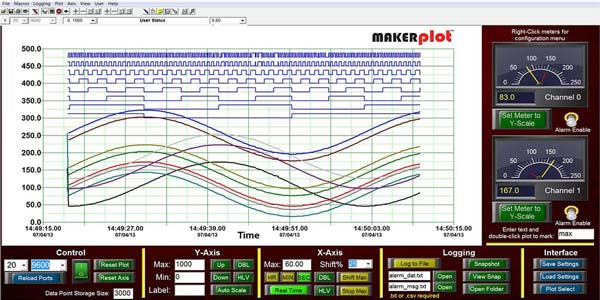
MakerPlot — The DIY Software Kit Part 6

MakerPlot — THE DIY SOFTWARE KIT PART 6
Graphical plotting, data acquisition, and control software for your microcontroller.

See how to have MakerPlot send info to your micro of choice to control the firmware’s setpoint using a “slider.”

Plot It Now!
Do You Love Robots? - Subscribe To SERVO
Altura MIDI Theremin
Macchiato Mini-Synth
RetroGame
The Mentor’s Friend
Nuts & Volts On CD-ROM
3D LED Matrix Cube
TEENSY Graphics Interface
Arduino Graphics Interface
You are receiving this email because you have been a subscriber to Nuts & Volts Magazine, or have requested to receive our email newsletters. You may unsubscribe, change your email address or content preferences at any time through the links provided below.
Facebook
Twitter
Nuts & Volts Magazine | 2279 Eagle Glen Pkwy #112-481, Corona, CA 92883
951.371.8497 | editor | www.nutsvolts.com
T & L Publications, Inc, 2279 Eagle Glen Pkwy #112-481, Corona, CA 92883, United States, 951 371-8497

Unsubscribe Manage preferences