Amateur Radio Weekly Newsletter
Ham radio news, commentary, giveaways, and more!
Celebrating 25 years of service – 1995-2021
Over 8,000 subscribers!
Unsubscribe
Saturday, November 19, 2022
- AmateurLogic 175: Oh The Humanity
AmateurLogic.TV Episode 175 is now available for download. Kay Savitz, K6KJN joins us to discuss the Internet archive.org special project that’s creating a huge online arena of Ham Radio resources. Learn what’s available and how you can enjoy it for years to come. Tommy updates us on the latest version of the VC4SL battery charger. … Continue reading AmateurLogic 175: Oh The Humanity
- For those Icom 7610 owners a different way to work split.
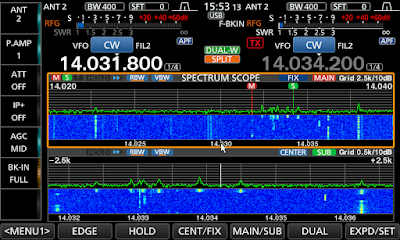
Fixed mode with 20kHz span I have had my Icom 7610 for several years now and am still very much enjoying it. From time to time I enjoy working DXpeditions and having Dual receivers and dual spectrum scopes with the Icom 7610 is very handy. The spectrum scope has 2 tuning options which are fixed and center modes. It could just be me but I find center mode hard to follow were as fixed mode seems very easy to follow. When you come across a station that is working split more often than not it’s because there is a large pileup and it’s more efficient to work split. For those readers who are not certain what split operation is this LINK explains it better than I can.
During split operation especially with a very rare DX station, there are LOTS of operators trying to contact the prized DX station. For this reason on the DX’s listening frequency, there are many ops trying to make contact. When you as an operator want to get involved and try to contact the DX station you have to drop yourself in the pool of stations calling the DX station.
The trick is where to set your VFO dial to have a chance to be heard by the DX station. In most cases, the DX station has a routine to move up or down his listening frequency which is your transmit frequency. One must listen and watch the waterfall to see who the DX station is answering call after call. You can then get the idea if he is moving up or down his listening frequency and by how much.As I said there could be lots of callers and this translates to a very crowded waterfall display. To find out where to drop your call one must have a closer look at the waterfall. When this is done you can get some separation between the calling stations. Thus allowing you to better see who the DX station is answering. Then you have a good idea when and where to drop your call and hopefully be heard.
As I said the center mode I find very confusing and when I use it in split mode and spin the VFO I am just lost as to who is where and for this reason I use fixed mode.As a side note: In center mode when you spin the VFO the signals on the waterfall move and the VFO marker remains stationary. In center mode when the VFO is changed the waterfall signals remain stationary and the VFO marker moves to the next signal.
As was said earlier it is best to have a closer look at the waterfall to see the action. In fixed mode, the smallest slice of the band you can have is 20khz. When operating CW as I do this for me is not enough for a very crowded calling group. In center mode, you can get a slice all the way down to +/- 2.5kHz or +/- 5kHz. For me, these are great options and with CW I generally would choose +/-2.5kHz but the rig has to be in center mode and that just does not work for me.
I have found a workaround so I can use the center mode, select +/-2.5kHz and still have the moving VFO B marker and not a moving waterfall! Below are the setup steps I take to make this happen.In fixed mode, I find the DX station with VFO A
I then press the Dual-W button
Then press and hold Dual-W button to get the settings for VFO B the same as VFO A
I then press the split button
I press the Dual soft key my scope becomes over-under as this is how it is setup. You can see the dual scope view in the post pictures.
I change both scopes to center mode if not there already.
I now set the span to the same on each lower and upper scope in my case it is +/-2.5kHz I then touch VFO B frequency readout on the upper band scope (to activate VFO B)
Now in the upper band scope, VFO A remains stationary on the DX station. VFO B (in the upper band scope) now moves when the VFO dial is turned. The VFO marker moves (like fixed mode) and the band signals remain stationary.
The lower scope is still there but I don’t pay any attention to it. I found if I did not stay in dual scope mode I would lose the CENTER mode for VFO A and FIXED mode for VFO B.
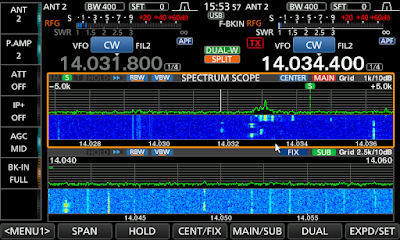
5+/-kHz in center mode but VFO acts like fixed mode Now with all this said I just know there is going to be a comment that informs me I can press 2 simple buttons on the rig and get the same results. I seem to always take the long way around with things. I have added some screen pics of how the waterfall looks when in 20kHz, +/-5kHz and +/-2.5kHz span during a DXpedition. As you can see when in +/-2.5kHz mode the calling station are easy to see compared to fix 20kHz and +/-5kHz selections. But best of all I have fixed mode operation of VFO B with these small spans.
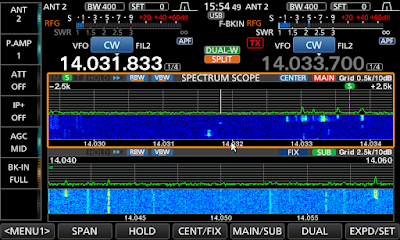
+/-2.5kHz span view of pile up calling DX station
- For those Icom 7610 owners a differant way to work split.
Fixed mode with 20kHz span I have had my Icom 7610 for several years now and am still very much enjoying it. From time to time I enjoy working DXpeditions and having Dual receivers and dual spectrum scopes with the Icom 7610 is very handy. The spectrum scope has 2 tuning options which are fixed and center modes. It could just be me but I find center mode hard to follow were as fixed mode seems very easy to follow. When you come across a station that is working split more often than not it’s because there is a large pileup and it’s more efficient to work split. For those readers who are not certain what split operation is this LINK explains it better than I can.
During split operation especially with a very rare DX station, there are LOTS of operators trying to contact the prized DX station. For this reason on the DX’s listening frequency, there are many ops trying to make contact. When you as an operator want to get involved and try to contact the DX station you have to drop yourself in the pool of stations calling the DX station.
The trick is where to set your VFO dial to have a chance to be heard by the DX station. In most cases, the DX station has a routine to move up or down his listening frequency which is your transmit frequency. One must listen and watch the waterfall to see who the DX station is answering call after call. You can then get the idea if he is moving up or down his listening frequency and by how much.As I said there could be lots of callers and this translates to a very crowded waterfall display. To find out where to drop your call one must have a closer look at the waterfall. When this is done you can get some separation between the calling stations. Thus allowing you to better see who the DX station is answering. Then you have a good idea when and where to drop your call and hopefully be heard.
As I said the center mode I find very confusing and when I use it in split mode and spin the VFO I am just lost as to who is where and for this reason I use fixed mode.As a side note: In center mode when you spin the VFO the signals on the waterfall move and the VFO marker remains stationary. In center mode when the VFO is changed the waterfall signals remain stationary and the VFO marker moves to the next signal.
As was said earlier it is best to have a closer look at the waterfall to see the action. In fixed mode, the smallest slice of the band you can have is 20khz. When operating CW as I do this for me is not enough for a very crowded calling group. In center mode, you can get a slice all the way down to +/- 2.5kHz or +/- 5kHz. For me, these are great options and with CW I generally would choose +/-2.5kHz but the rig has to be in center mode and that just does not work for me.
I have found a workaround so I can use the center mode, select +/-2.5kHz and still have the moving VFO B marker and not a moving waterfall! Below are the setup steps I take to make this happen.In fixed mode, I find the DX station with VFO A
I then press the Dual-W button
Then press and hold Dual-W button to get the settings for VFO B the same as VFO A
I then press the split button
I press the Dual soft key my scope becomes over-under as this is how it is setup. You can see the dual scope view in the post pictures.
I change both scopes to center mode if not there already.
I now set the span to the same on each lower and upper scope in my case it is +/-2.5kHz I then touch VFO B frequency readout on the upper band scope (to activate VFO B)
Now in the upper band scope, VFO A remains stationary on the DX station. VFO B (in the upper band scope) now moves when the VFO dial is turned. The VFO marker moves (like fixed mode) and the band signals remain stationary.
The lower scope is still there but I don’t pay any attention to it. I found if I did not stay in dual scope mode I would lose the CENTER mode for VFO A and FIXED mode for VFO B.
5+/-kHz in center mode but VFO acts like fixed mode Now with all this said I just know there is going to be a comment that informs me I can press 2 simple buttons on the rig and get the same results. I seem to always take the long way around with things. I have added some screen pics of how the waterfall looks when in 20kHz, +/-5kHz and +/-2.5kHz span during a DXpedition. As you can see when in +/-2.5kHz mode the calling station are easy to see compared to fix 20kHz and +/-5kHz selections. But best of all I have fixed mode operation of VFO B with these small spans.
+/-2.5kHz span view of pile up calling DX station
- Ever Heard Of Heathkit’s SS-8000 Digital Transceiver? …. Me Neither!
courtesy N8RSThe Heathkit SS-8000 was a unique synthesized HF transceiver (160-10m) originally designed as a kit in 1978. The reason that very few hams have heard of it is that it was never released … and only three were ever prototyped!Robert Sumption…
- LHS Episode #489: 2CW or not 2CW
Hello and welcome to Episode #489 of Linux in the Ham Shack. In this short-topics episode, the hosts cover the future of morse code in amateur radio, more grants from …
- Amateur Radio Weekly – Issue 262
Ever heard of the Heathkit SS-8000 Digital Transceiver? The reason that very few Hams have heard of it is that it was never released. VE7SL CW Hotline Think The Bat Phone for CW. Ham Radio Solutions DATV Trans-Atlantic experiments Successful Digital Amateur TV tests on the 29 MHz band across the North Atlantic. EI7GL FediHams […]
Thank you for being an AmateurRadio.com reader and subscriber to the Amateur Radio Newsletter.
Do you like to write? Please consider submitting an article.
Matt W1MST
Managing Editor
editor
Twitter / Facebook
How to set up your own ham radio blog – Get started in less than 15 minutes
AmateurRadio.com
P.O. Box 45
Hampden ME 04444
USA
 WD0AJG - Hamming for over 40 years